写批处理脚本时需要这种工具,试了cido、cax都不能倒计时自动确认,故用ai写了一个ahk(v1)代码,可以转为exe,供批处理调用。
调用方法:
转为exe,方便批处理中使用
test.bat
- @echo off
- cd /d "%~dp0"
- yesnotimer "标题\n正文1\n正文2" 7
- if "%errorlevel%" equ "7" (
- echo 你选择了 否
- ) else (
- echo 你选择了 是
- )
- pause
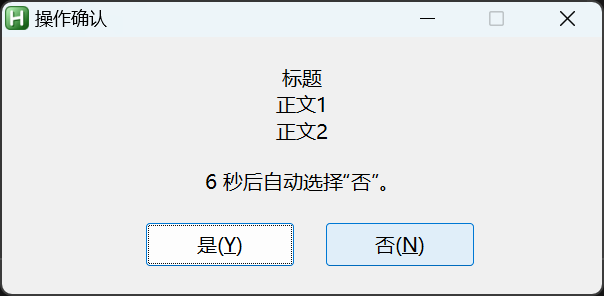
弹窗样式:
yesnotimer.ahk
- #NoEnv
- #NoTrayIcon
- #SingleInstance, Force
- SetBatchLines, -1
- ;--------------------------------------------------
- ; 参数:
- ; 参数1 = 提示内容,支持用 \n 表示换行
- ; 参数2 = 倒计时秒数
- ;
- ; 返回值:
- ; 6 = 是
- ; 7 = 否、空格、Esc、关闭窗口或超时
- ;
- ; 快捷键:
- ; Enter = 是
- ; 小键盘 Enter = 是
- ; Space = 否
- ; Esc = 否
- ;--------------------------------------------------
- Prompt = %1%
- Timeout = %2%
- ; 未传入提示内容时的默认文字
- if (Prompt = "")
- Prompt := "是否继续执行?"
- ; 将参数中的 \n 或 \N 转换成真正的换行
- Prompt := StrReplace(Prompt, "\n", "`n")
- Prompt := StrReplace(Prompt, "\N", "`n")
- ; 超时参数无效时,默认10秒
- if Timeout is not integer
- Timeout := 10
- if (Timeout <= 0)
- Timeout := 10
- Remaining := Timeout
- ;--------------------------------------------------
- ; 创建窗口
- ;--------------------------------------------------
- Gui, +AlwaysOnTop +HwndDialogHwnd
- Gui, Margin, 20, 18
- Gui, Font, s10, Microsoft YaHei UI
- Gui, Add, Text, w360 Center, %Prompt%
- Gui, Add, Text, w360 Center y+15 vCountdownText
- , %Remaining% 秒后自动选择“否”。
- Gui, Add, Button, xm+75 y+18 w100 h30 Default vYesButton gChooseYes
- , 是(&Y)
- Gui, Add, Button, x+20 w100 h30 vNoButton gChooseNo
- , 否(&N)
- Gui, Show, AutoSize, 操作确认
- ; 默认将焦点放在“是”按钮
- GuiControl, Focus, YesButton
- SetTimer, UpdateCountdown, 1000
- return
- ;--------------------------------------------------
- ; 每秒更新倒计时
- ;--------------------------------------------------
- UpdateCountdown:
- Remaining--
- if (Remaining <= 0)
- {
- SetTimer, UpdateCountdown, Off
- ExitApp, 7
- }
- GuiControl,, CountdownText
- , %Remaining% 秒后自动选择“否”。
- return
- ;--------------------------------------------------
- ; 选择“是”
- ;--------------------------------------------------
- ChooseYes:
- SetTimer, UpdateCountdown, Off
- ExitApp, 6
- return
- ;--------------------------------------------------
- ; 选择“否”
- ;--------------------------------------------------
- ChooseNo:
- SetTimer, UpdateCountdown, Off
- ExitApp, 7
- return
- ;--------------------------------------------------
- ; 关闭窗口或按 Esc,均按“否”处理
- ;--------------------------------------------------
- GuiClose:
- GuiEscape:
- SetTimer, UpdateCountdown, Off
- ExitApp, 7
- return
- ;--------------------------------------------------
- ; 仅在本程序窗口激活时启用快捷键
- ;--------------------------------------------------
- #If WinActive("ahk_id " . DialogHwnd)
- Enter::
- NumpadEnter::
- Gosub, ChooseYes
- return
- Space::
- Gosub, ChooseNo
- return
- #If
yesnotimer.exe文件
 yesnotimer.rar
(495.14 KB)
yesnotimer.rar
(495.14 KB)
|


 发表于
发表于