找回密码
 注册
搜索
[新手上路]批处理新手入门导读[视频教程]批处理基础视频教程[视频教程]VBS基础视频教程[批处理精品]批处理版照片整理器
[批处理精品]纯批处理备份&还原驱动[批处理精品]CMD命令50条不能说的秘密[在线下载]第三方命令行工具[在线帮助]VBScript / JScript 在线参考
查看: 15091|回复: 6

[问题求助] 【已解决】vbs检测进程

[复制链接]
发表于 2022-9-16 11:24:21 | 显示全部楼层 |阅读模式
本帖最后由 yyz219 于 2022-9-17 09:55 编辑

问题解决了:
  1. '【有notepad2.exe进程--→运行"用Notepad3打开.vbs"】【无notepad2.exe进程--→运行"用Notepad2打开.vbs"】
  2. ProcExist = "0"
  3. Set objWMIProcess = GetObject("winmgmts:\\.\root\cimv2").ExecQuery("Select * From Win32_Process")
  4. For Each objProcess In objWMIProcess
  5. If objProcess.Name = "Notepad2.exe" Then  '【左边是需要检测的进程】
  6. ProcExist = "1"
  7. '【notepad2.exe进程存在】【用notepad3.exe打开文本】
  8. CreateObject("WScript.Shell").Run "用Notepad3打开.vbs",0
  9. WScript.Quit '【退出】
  10. End If
  11. Next
  12. If ProcExist = "0" Then
  13. '【notepad2.exe进程不存在】【用Notepad2打开打开文本】
  14. CreateObject("WScript.Shell").Run "用Notepad2打开.vbs",0
  15. WScript.Quit '【退出】
  16. End If
复制代码
*************************************************************
原来的问题:
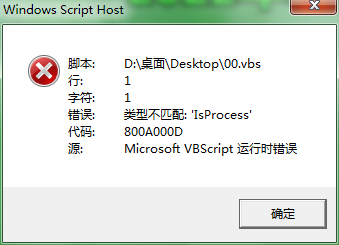
00.vbs:

If IsProcess("qq.exe") =True Then

MessageBox"发现进程"

Else

MessageBox"没有发现进程"

End If
发表于 2022-9-16 12:27:40 | 显示全部楼层
回复 1# yyz219
  1. Set objWMIProcess = GetObject("winmgmts:\\.\root\cimv2").ExecQuery("Select * From Win32_Process")
  2. For Each objProcess In objWMIProcess
  3.     If objProcess.Name = "QQ.exe" Then
  4.         WScript.Echo objProcess.Name
  5.     End If
  6. Next
复制代码

评分

参与人数 1技术 +1 收起 理由
yyz219 + 1 能不能弄出:MessageBox"发现进程" 和 M ..

查看全部评分

 楼主| 发表于 2022-9-16 12:37:24 | 显示全部楼层
回复  yyz219
Batcher 发表于 2022-9-16 12:27


    能不能弄出:MessageBox"发现进程" 和  MessageBox"没有发现进程?

谢谢
发表于 2022-9-16 14:05:09 | 显示全部楼层
回复 3# yyz219
  1. ProcExist = "0"
  2. Set objWMIProcess = GetObject("winmgmts:\\.\root\cimv2").ExecQuery("Select * From Win32_Process")
  3. For Each objProcess In objWMIProcess
  4.     If objProcess.Name = "QQ.exe" Then
  5.         ProcExist = "1"
  6.     End If
  7. Next
  8. If ProcExist = "0" Then
  9.     MsgBox "Process QQ.exe not exist"
  10. Else
  11.     MsgBox "Process QQ.exe exist"
  12. End If
复制代码
发表于 2022-9-16 14:06:00 | 显示全部楼层
如果进程不存在则启动相关应用程序
  1. ProcExist = "0"
  2. Set objWMIProcess = GetObject("winmgmts:\\.\root\cimv2").ExecQuery("Select * From Win32_Process")
  3. For Each objProcess In objWMIProcess
  4.     If objProcess.Name = "QQ.exe" Then
  5.         ProcExist = "1"
  6.     End If
  7. Next
  8. If ProcExist = "0" Then
  9.     Set objShell = WScript.CreateObject ("WSCript.Shell")
  10.     objShell.Run """C:\Program Files (x86)\Tencent\QQ\Bin\QQ.exe"""
  11. End If
复制代码

评分

参与人数 1技术 +1 收起 理由
yyz219 + 1 乐于助人

查看全部评分

 楼主| 发表于 2022-9-16 14:17:47 | 显示全部楼层
如果进程不存在则启动相关应用程序
Batcher 发表于 2022-9-16 14:06


    非常感谢
 楼主| 发表于 2022-9-16 15:58:00 | 显示全部楼层
本帖最后由 yyz219 于 2022-9-16 17:03 编辑

可以了(就是代码还是有一点长)【不知道还能不能精简】:

ProcExist = "0"
Set objWMIProcess = GetObject("winmgmts:\\.\root\cimv2").ExecQuery("Select * From Win32_Process")
For Each objProcess In objWMIProcess
    If objProcess.Name = "Notepad2.exe" Then
        ProcExist = "1"
MsgBox "发现进程"
WScript.Quit
   End If
Next
If ProcExist = "0" Then
    MsgBox "没有发现进程"
WScript.Quit
End If
您需要登录后才可以回帖 登录 | 注册

本版积分规则

Archiver|手机版|小黑屋|批处理之家 ( 渝ICP备10000708号 )

GMT+8, 2026-3-17 02:31 , Processed in 0.021596 second(s), 9 queries , File On.

Powered by Discuz! X3.5

© 2001-2026 Discuz! Team.

快速回复 返回顶部 返回列表
