本帖最后由 小白龙 于 2026-3-23 16:21 编辑
我想把powershell控制台的窗口设置为固定大小, 宽度为1024像素, 高度为360像素, 然后窗口水平居中,
但是powershell控制台的窗口大小是由下图的三个参数(屏幕缓冲区,窗口大小, 窗口位置)共同决定的, 而且有时调整不了宽度或高度(选定图中属性布局设置中的那两个复选框时)
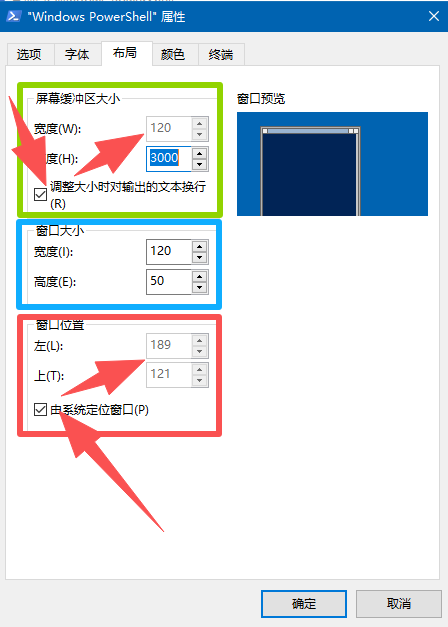
下面有个文章很详细:
https://blog.csdn.net/2401_83950228/article/details/138104663
下面是个不完善的代码, 求大佬改进.
- #@&cls&powershell "gc '%~f0'|out-string|iex"&pause&exit
- Add-Type @'
- using System.Runtime.InteropServices;
- public static class WinApi{
- [DllImport("user32.dll")] public static extern bool SetWindowPos(uint hWnd,uint hAfter,uint x,uint y,uint cx,uint cy,uint flags);
- [DllImport("kernel32.dll")] public static extern uint GetConsoleWindow();
- }
- '@
- Add-Type -Ass System.Windows.Forms
- $w = [Windows.Forms.Screen]::PrimaryScreen.Bounds.Width
- $h = [WinApi]::GetConsoleWindow()
- [WinApi]::SetWindowPos($h, $null, ($w-1060)/2, 20, 1060, 386, 0)
|


 发表于
发表于